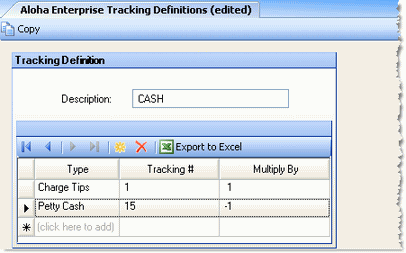
For the Aloha Enterprise POS system, a tracking number is associated with a description to create a tracking definition. The description is then placed in correspondence with a DSR field in the POS Mapping Utility screen.
See the General Procedure for how this screen fits in the context of POS integration.
Fill in the following fields:
Description Enter a description of 20 letters or less to associate with the tracking number. It will be carried to the POS Mapping Utility screen, where this description is correlated with a DSR field, creating a POS field/DSR field one-to-one correspondence.
Type Select one of the listed types to identify the type of field to be associated with the description.
Tracking # The Aloha Enterprise field number to be associated with the description.
Multiply By Select "-1" from the drop-down list to designate that this field will be subtracted after being polled. For example, you may have Comp values that are entered into the POS and represent negative numbers. You can identify these fields as those to multiply by -1 after Compeat adds them up.
Save the association and create new ones until all your associations are made.