Void Waste/Donations
The Void Waste/Donations screen allows you to void posted waste/donation
transactions. This feature only permits you to void entire posted waste/donation
vouchers; you cannot remove single lines from posted waste/donation vouchers.
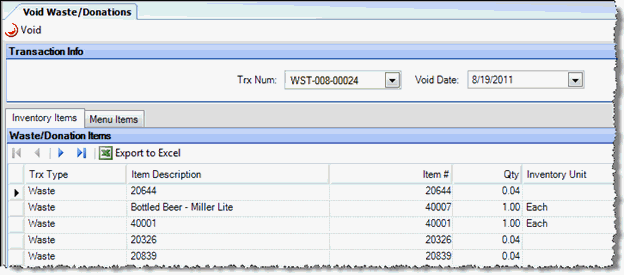
Transaction Info
- Trx Num This field displays
the voucher number for the transaction you want to void.
- Trx Date Enter the date
you want this transaction to post.
Inventory/Menu Item
Each button will display the relevant items in each class for the selected
voucher.
Detail Area
The details of the posted voucher are viewable but cannot be edited.
- Trx Type states if this item was posted as a donation or as waste.
- Item Description, Item #, Inventory Unit, Amt. Each, Ext. Price
details from the posted transaction will show here. This information
cannot be edited but can be viewed to verify the details of the transaction
that you want to void.
- Qty gives you the total amount of inventory units that were depleted
by this transaction.
- Reason Code this is a description of that can optionally be entered
when the transaction is created. The codes must be pre-defined in
Inventory Transfer Reason Codes.