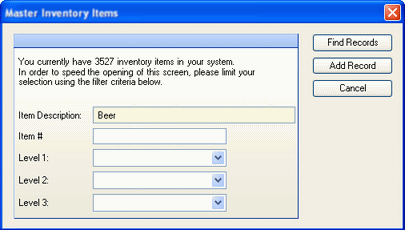
If you are connected to a database via remote access and have over 2000 records of a particular type, the pre-filter screen will be displayed prior to displaying your records. This allows you to filter the records before they are retrieved from your database to improve performance.
You can filter by Item Description, Item #, or Levels. To retrieve all records, simply leave the fields blank and click Find Records. If you want to add a new record, click Add Record.
You will be offered the pre-filtering option every time you open Master Inventory Items, Restaurant Inventory Items, or Menu Items screens (when on remote access with more than 2000 records).
The following fields are available for filtering:
Item Description Enter either a complete Item description or a keyword of the description. All records containing the description or key word will be retrieved.
Item # If you know the item # of the record you wish to retrieve, you can enter it to go directly to the record.
Levels 1-3 Select one or more levels from the drop-down choices to filter records by level.
Once you have entered your filtering criteria, click Find Records to retrieve records matching your criteria.