The Backup Database feature allows you to create a backup of your database that can then be retrieved in case of data loss. You can add security to the backup file by requiring a password to restore it. You can also setup the system to remind you to backup periodically, or automatically backup.
Only users who have backup permissions set in SQL Server Management Studio security can perform backups. Users must be a member of the sysadmin SQL Server group if logging in using LAN access. If logging using remote access, no special permissions are required.
Note: It is a good idea to back up your data to a removable medium such as a CD-ROM or tape drive.
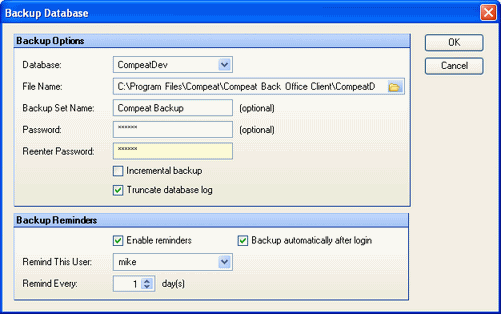
The screen appears similar to the following:
Use the following fields to configure your backup options:
Database Select the database that you would like to backup from the drop-down list. The list is autogenerated from all Compeat databases on your SQL Server.
File Name Select a destination folder where you would like to save your backup file. Enter a file name followed by the .bak extension.
Backup Set Name Optionally enter a name for the backup. This name will display in SQL Server Management Studio.
Password (optional) You can set a password that will be required to restore the backup database.
Incremental backup Check to enable incremental backup. This is a space saving feature that adds only new data to an existing backup. When it is unchecked, the entire database will be saved each time you backup.
Note: Often an effective strategy is to perform full backups once a week and incremental backups during the week.
Truncated database log Check to create a truncated SQL Server log file. Truncating the database log will save disk space and is generally recommended. However, a complete database log allows you to go back and restore from a specific point in the database history; otherwise, with a truncated log file, you will only be able to restore from the backup points.
Enable reminders Check to enable the reminder feature. With this feature, you will be able to receive periodic reminders to backup the database.
Remind this User Specify the user who should be reminded. The reminder will only be displayed if this user is logged in.
Remind Every Specify how often you would like to receive a reminder to backup.
Backup automatically after login Check to automatically perform a backup every time you login.
To restore the database from a backup, you must exit Compeat and perform the task through SQL Server Management Studio. See SQL Server Management Studio documentation for instructions.