Daily Report Subscriptions
Daily Report Subscriptions
This screen is where you determine which Users in Compeat will be receiving
the Daily Report Subscription emails. This is also where you determine
what information is included in each User’s email. Daily Report Subscriptions
are going to be distributed for each Entity the User has Security Access
to.
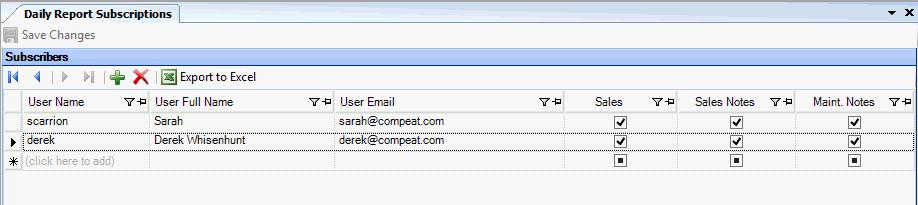
Description Of Fields
- User Name
Select each User that wishes to receive the Daily Reports Subscription.
- User Full Name
This field will auto-populate based on the User selected. If this
field is blank, then the Full Name is not filled in in the User Record
in Setup > Security > Users.
- User Email
(required) This field will auto-populate based on the User
selected. If this field is blank, then the Email Address is not filled
in in the User Record in Setup > Security > Users.
- Sales
Check this box if the User wishes to have the Sales figures
included in the Daily Report Subscription.
- Sales Notes
Check this box if the User wishes to have the Sales Notes included
in the Daily Report Subscription.
- Maint. Notes
Check this box if the User wishes to have the Maintenance Notes included
in the Daily Report Subscription.